Black Friday Voice-to-Text Trial: Get Your First Transcript
The most useful first step in a transcription trial is a finished transcript. Start with a short voice note, listen to it, convert it to text and check whether the result is useful in your normal work. WhisperUI’s browser recorder lets an eligible subscriber or trial user try that workflow without installing the desktop application.
For November 2026 enrollment, eligible USD Pro subscriptions have a US$9.95/month price lock plus applicable tax while the subscription stays active. Eligible new personal subscriptions include a three-day trial. A card is required, and you must cancel before the trial ends to avoid the first charge. Upgrades and additional teams do not receive a new trial.
Open checkout by November 30, 2026, at 11:59 p.m. São Paulo time (UTC−3), then complete it within one hour. Canceling or changing plans ends the locked price. Check current offer availability and full terms before you enroll.
1. Choose one small, realistic task
Use a ten-second note that resembles something you would otherwise type: a meeting reminder, a short email draft or a thought for a document. For example:
Please send the meeting notes to the team tomorrow morning, and add the next steps to our project plan.
A short recording lets you check the complete path quickly. After it works, try a longer sample with the vocabulary and recording conditions that matter to you. Do not start with your most important or sensitive recording just to learn where the controls are.
2. Open the browser recorder
After subscribing or starting an eligible trial through pricing, sign in and open Record Audio. A new trial with no cloud usage is guided toward a first recording from the dashboard.
Choose Start recording and allow microphone access when your browser asks. Recording begins through that action; simply opening the page does not start the microphone. Speak naturally and keep a reasonably consistent distance from the microphone.
If the browser cannot access the microphone, check that you selected the correct input and that the site has permission to use it. If you already have a recording, you can use the audio-file upload workflow instead of recording a new note.
3. Finish and listen back
Choose Finish recording after the sentence or short note. Play the recording before uploading it. You should be able to hear the words clearly without guessing.
If the recording is silent, badly clipped or dominated by background noise, make another short take. Improving the source recording is often more helpful than repeatedly processing the same unclear audio. You can use the trial to test your actual microphone and room, not just a prepared demonstration.
4. Upload and transcribe deliberately
Choose Upload & Transcribe, review the upload details and confirm when you are ready. This sends the recording for cloud transcription. You can provide a useful optional prompt for names or context, but it is still important to check the result yourself.
The first-recording guide points you to the transcript after the job is queued. Processing time can vary; a demonstration with condensed processing is not a guarantee that every recording will finish in the same number of seconds.
If you prefer to keep transcription processing on your computer, use the desktop local workflow instead. It requires online activation and a downloaded local model before offline use. The browser cloud upload described here is a different processing path.
5. Review and reuse the text
Read the transcript while referring back to the recording. Pay particular attention to names, dates, amounts, specialist terms and any words that change the meaning of a sentence. Correct those details before using the transcript in another document.
Here is an actual WhisperUI result from the example voice note used for our Black Friday demonstration:
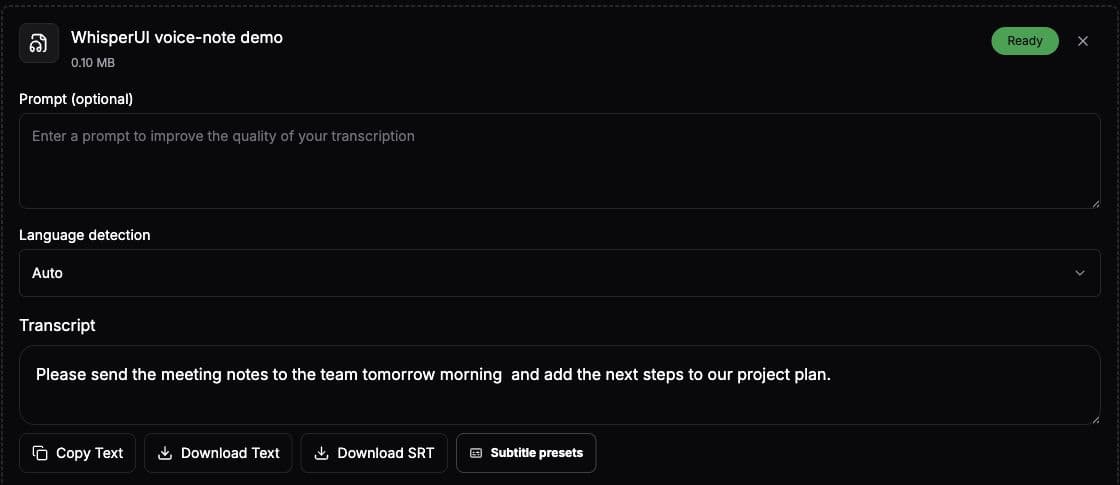
Use Copy Text for a note or draft, or download the text file. SRT output is useful when you need timed subtitles rather than a plain transcript. A transcript records the spoken content; review it before treating it as polished meeting notes or final copy.
What to check during the rest of the trial
After the short note, choose one representative recording from your regular work. Check whether the audio-to-text result, correction effort and export options fit your process. If you need meetings or dictation, test those workflows separately and review their allowances.
Pro includes unlimited cloud transcription minutes with up to 40 cloud transcriptions per day, 3,000 shared cloud dictation minutes per month, five total team seats and eight hours of meeting recording per month. These are separate limits, so check the activity that will matter most after the trial.
Note the exact trial end shown at checkout. If you decide to stop, cancel in subscription settings before that time to avoid the first charge. If you continue with an eligible November Pro subscription, the locked monthly price lasts while it remains active; canceling or changing plans ends the lock.
Frequently asked questions
Do I need to install anything for the first voice note?
No desktop installation is needed for the browser recording and cloud transcription workflow. It needs a supported browser, microphone permission for recording, internet access and an active subscription or trial for cloud transcription.
What if I only need occasional local transcription?
Both Starter and Pro include unlimited local desktop transcription. Compare your cloud, dictation and meeting needs in the cloud-versus-local guide before choosing a plan.
Can I claim the offer after November by reading this article?
No. This article describes the November 2026 offer and a practical trial workflow. The official Black Friday page reports whether enrollment is available. The price-lock guide explains what continues after enrollment closes.